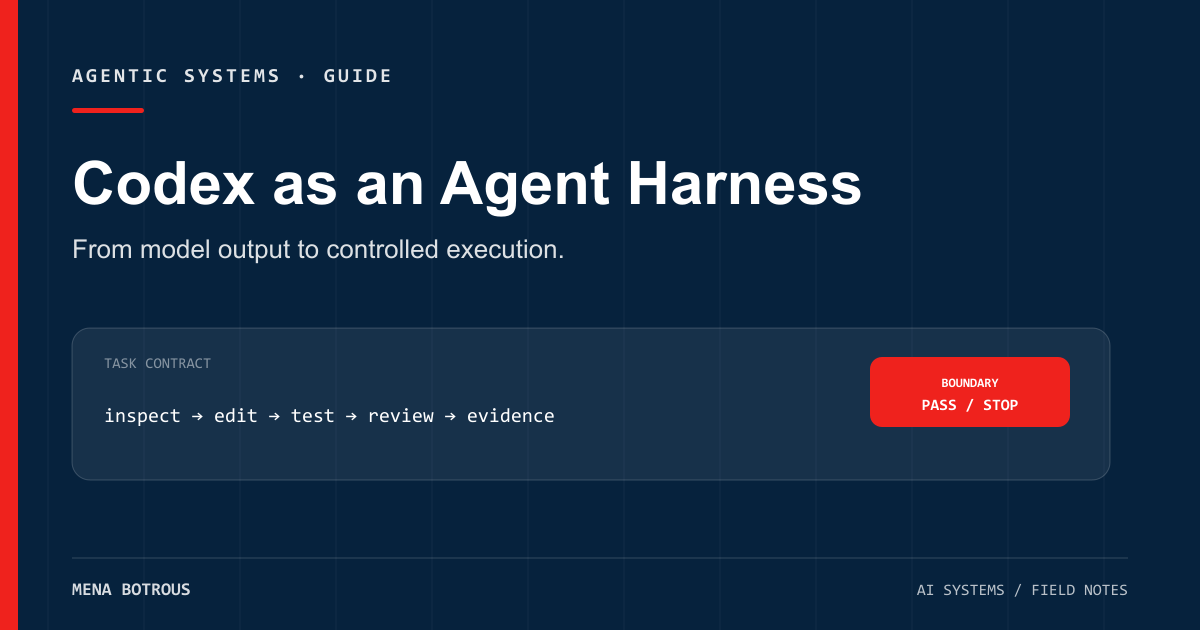
Calling Codex “a model in your terminal” is convenient, but incomplete.
The model reasons. The CLI harness decides what context it receives, which tools it can use, where it can write, when it needs approval, and how the session continues. Your workflow supplies the task, checks, and release rules.
Confusing those layers leads to bad tool decisions. A stronger model does not repair weak project instructions. A polished terminal interface does not create a definition of done. Full filesystem access does not guarantee useful autonomy.
Here is the clean way to separate the pieces.
The stack in one table
| Layer | Codex example | Question to ask |
|---|---|---|
| Model | The selected OpenAI coding model | Is it strong enough for this reasoning task? |
| Harness | Codex CLI or app | Can it inspect, edit, run, and iterate? |
| Context | Prompt, repository files, AGENTS.md |
Does it know the local rules and constraints? |
| Tools | Shell, files, search, MCP | Can it observe and change the environment? |
| Boundary | Sandbox, approvals, network policy | What can it do without escalation? |
| Workflow | Tests, review, preview, release gate | How will we know the result is acceptable? |
Codex CLI occupies the harness layer. It packages the loop around the model and exposes controls for the other layers.
What the harness actually does
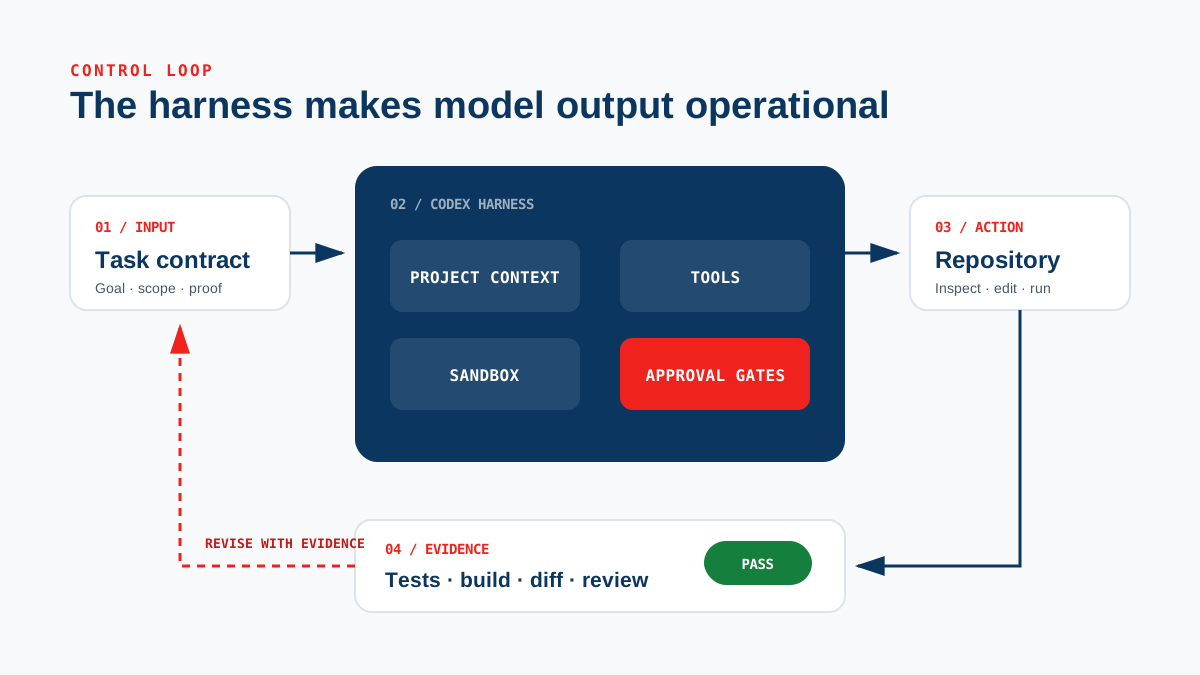
A coding-agent harness typically performs a repeating cycle:
- assemble instructions and project context;
- ask the model for the next action;
- execute or request approval for that action;
- return the observation to the model;
- continue until the task completes or stops.
The value is not merely that Codex can write code. The value is that it can inspect the repository, make a change, run a command, read the failure, and revise the implementation.
That feedback loop is what separates an agent from one-shot code generation.
Five Codex commands worth knowing
The installed CLI exposes a broad command surface, but these cover the common operating patterns.
1. Start an interactive session
codex
Use this when the task benefits from conversation, steering, and incremental review.
You can start with a prompt:
codex "Inspect this repository and explain the build and test workflow"
2. Run a bounded non-interactive task
codex exec "Run the tests, diagnose the first failure, and report evidence"
codex exec is useful for scripts and repeatable jobs. The prompt still needs an explicit scope and output contract.
3. Request a code review
codex review
A review is a separate job from implementation. Run it after the change exists, not as a substitute for tests or a human release decision.
4. Resume previous work
codex resume --last
Resuming preserves conversational context. The repository remains the source of truth, so the agent should still inspect current files and Git state before acting.
5. Inspect integrations
codex mcp --help
MCP extends the harness with external tools. Add servers narrowly. Every connection expands both capability and risk.
Project context belongs in the repository
A prompt describes the task. AGENTS.md describes how work should be done in a project.
Useful project instructions include:
- the exact build, test, and lint commands;
- architecture boundaries;
- naming and style conventions;
- directories the agent must not modify;
- required validation before completion;
- release or deployment restrictions.
Keep the file operational. “Write good code” is not operational. “Run npm test and npm run build; do not modify generated files” is.
A compact example:
# Project rules

## Validation
- Run `npm test` before completion.
- Run `npm run build` after route or schema changes.
- Report actual exit codes; never infer success.

## Safety
- Do not push to `main`.
- Do not publish without an explicit release approval.
- Keep secrets out of files and logs.
This context travels with the code and helps any compatible agent operate consistently.
Sandbox and approvals are design choices
Codex supports sandbox modes and approval policies. These are not speed settings. They define the trust boundary.
A workspace-write sandbox can allow routine reads, edits, and commands inside the current project while restricting broader filesystem or network access. Approval policy determines when the agent must escalate.
The safest useful default is usually:
- a narrow working directory;
- write access limited to that workspace;
- network access off unless needed;
- approval for actions outside the normal boundary;
- no automatic public release.
The flag that bypasses approvals and sandboxing is intentionally named as dangerous. It is not a productivity shortcut for normal work.
A better task contract
Weak instruction:
Improve the blog.
Operational instruction:
On a feature branch, add topic and format filtering to the blog index. Preserve the existing visual system. Add tests for taxonomy validation, run the test suite and production build, then provide a local or deployment preview. Do not merge or publish.
The second instruction defines:
- workspace and branch boundary;
- concrete behavior;
- design constraint;
- required checks;
- deliverable;
- release gate.
The model still has room to reason. The harness has a clear loop to run.
Codex alone is not the workflow
A strong harness can automate implementation, but a dependable operating system still needs external structure:
- issue or task intake;
- source and requirement tracking;
- test and evaluation suites;
- independent review;
- deployment previews;
- approval gates;
- rollback and incident handling.
Some of that structure can live inside Codex configuration and project files. Some belongs in CI, GitHub, deployment platforms, or a broader agent system.
The right question is not “Can Codex build this?”
It is: “What evidence must the Codex loop produce before this change is allowed to move forward?”
That question turns a capable coding agent into a controlled engineering workflow.
Evidence ledger
Sources
- Codex CLI
OpenAI · Accessed 2026-07-15
Supports: Official CLI capabilities, interactive and non-interactive modes, and installation guidance.
- Agent Approvals and Security
OpenAI · Accessed 2026-07-15
Supports: Approval policy, sandbox modes, network boundaries, and security controls.
- AGENTS.md
OpenAI · Accessed 2026-07-15
Supports: How project instructions are discovered and applied by Codex.
- Model Context Protocol
OpenAI · Accessed 2026-07-15
Supports: How Codex connects MCP servers through CLI and configuration.
About the author
Mena Botrous
AI architect and founder of NuMust. I build agentic systems, automation pipelines, and practical AI operating models for businesses.
Discuss an AI system